
Microsoft Teams – Guest access settings
Here’s a useful video from Microsoft on how to fully setup guest access in teams. It involves changing settings in Azure Active Directory, Teams Admin, Microsoft 365 Groups, SharePoint Admin and individual SharePoint sites.
https://docs.microsoft.com/en-us/microsoft-365/solutions/collaborate-as-team?view=o365-worldwide
Enable or Disable write protection to a USB drive
PROBLEM: I need to stop users saving data to a bitlocker usb flash drive that they use to unlock their laptop.
SOLUTION: Use the DiskPart command line utility to enable read only access to the USB flash drive in question.
STEPS:-
- Press the Windows key + R to open the run box.
- Type diskpart and press enter.
- If you receive a UAC prompt asking for permission click Yes.
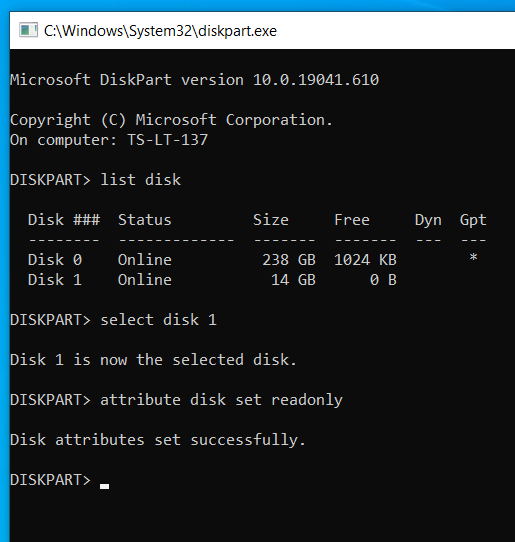
- At the DISKPART > prompt type list disk and press enter.
- Figure out which is your USB disk based on the size (mine was disk 1) so I typed select disk 1 and pressed enter.
- You can check the attributes for the disk by typing attributes disk.
- To enable disk write protection (making it not possible to save files to the disk) use the command attributes disk set readonly and press enter.
- You’re done! Type exit to quit.
- If you ever wanted to revert back and disable write protection then use the command attributes disk clear readonly and press enter.
Please note that the above method will only enable write protection for that particular usb flash drive on that specific windows machine. If you were to put the same usb flash drive in a different machine you can still write files to it.

Trek Remedy 2021 GX
After owning a Specialized Camber Expert 2011 for nearly 9 years it was about time for a change! I ride plenty of local trails with a mix of uphill, downhill, dirt jumps, drop off’s, descents and everything in between. I also regularly visit trail centres such as Gisburn, Whinlatter, Hamsterley, Llandegla and plenty of other places that Wales & Scotland have to offer.
Bikes have changed quite a lot since my last purchase and I wanted a bigger hitting more capable bike based on the different types of riding I do. More travel, slacker head angle, bigger wheels, 1×12 blah blah blah.
The COVID pandemic was upon us so it was a going to be a struggle to find any bikes in stock but after a bit of shopping around I found that Trek Bicycle Sheffield Fox Valley had x2 Trek Remedy 8’s in stock so I organised a visit and went over. As soon as I saw the bike I was wowed! It just looked a beast compared to my old one! It looked beefy with it’s 27.5 / 2.6″ tires, wide bars and extra travel, it just looked like it could handle some abuse.
Took it out for a quick blast down the road and round the car park and was sold. £200 deposit and it was secured. Couple of weeks later I had managed to sell the Specialised and got the rest of the cash together to make a purchase. No better feeling than NBD!
Specifications
Frameset
| Fork | RockShox Lyrik Select+, DebonAir spring, Charger 2.1 RC damper, tapered steerer, 46 mm offset, Boost110, 15 mm Maxle Stealth, 160 mm travel |
|---|---|
| Shock | RockShox Super Deluxe Select+, 230×57.5 mm |
| Max compatible fork travel | 170mm |
Wheels
| Wheel front | Bontrager Line Comp 30, Tubeless Ready, 6-bolt, Boost110, 15 mm thru axle |
|---|---|
| Hub front | Bontrager alloy, sealed bearing, alloy axle, 6-bolt, Boost110, 15 mm thru axle |
| Spokes | DT Swiss Champion, J-Bend, Black |
| Tyre | Bontrager XR4 Team Issue, Tubeless Ready, Inner Strength sidewalls, aramid bead, 120 tpi, 27.5×2.60″ |
| Bontrager XR5 Team Issue, Tubeless Ready, Inner Strength sidewalls, aramid bead, 120 tpi, 27.5×2.60″ | |
| Tyre part | Bontrager TLR sealant, 180 ml/6 oz |
| Bontrager TLR valve, 50 mm | |
| Max tyre size | Frame: 27.5×2.80″ Fork: See manufacturer |
Drivetrain
| Shifter | SRAM GX Eagle, 12-speed |
|---|---|
| Rear derailleur | SRAM GX Eagle |
| Crank | |
| SRAM X1 Eagle, DUB, 30T steel ring, Boost, 175 mm length | |
| Bottom bracket | SRAM DUB, 92 mm, PressFit |
| Cassette | SRAM Eagle XG-1275, 10-52, 12-speed |
| Chain | SRAM GX Eagle, 12-speed |
| Max. chainring size | 36T |
Components
| Saddle | Bontrager Arvada, hollow chromoly rails, 138 mm width |
|---|---|
| Seatpost | |
| Size: M, M/L, L, XL Bontrager Line Dropper, 150mm travel, internal routing, 31.6 mm, 440mm length |
|
| Handlebar | Bontrager Line, alloy, 35 mm, 27.5 mm rise, 820 mm width |
| Grips | Bontrager XR Trail Pro, alloy lock-on |
| Stem | Bontrager Line, 35 mm, Knock Block, 0-degree, 50 mm length |
| Brake | SRAM Code R hydraulic disc |
| Brake rotor | SRAM CenterLine, 6-bolt, round edge, 180 mm |
| SRAM CenterLine, 6-bolt, round edge, 200 mm |
Weight
| Weight | 14.07 kg (with TLR sealant, no tubes) |
|---|---|
| Weight limit | This bike has a maximum total weight limit (combined weight of bicycle, rider and cargo) of 136 kg (300 lb). |
How to add Azure Active Directory user to local administrator group
Windows 10 allows you to join your computer to the Azure Active Directory and login with your cloud credentials. The first account that joins the AAD becomes a local administrator. Subsequent users are not.
To add additional azure accounts as local admins you need to do the following…
- Open a command prompt with Administrator proviledges
- Enter the following command…
net localgroup administrators /add "AzureAD\<users office 365 email address>"
You should see “The command completed successfully”, now go check it worked by going into computer management > Local Users and Groups > Groups > Administrators and check to see if the user is listed.
Outlook keeps asking for password… Using Office 365 but on-premise exchange?
Starting in Outlook 2016 version 16.0.6741.2017, Microsoft has enabled a new feature called Direct Connect to Office 365. What this feature does is connect Outlook directly to Office 365 if Autodiscover is not working. This is great feature but a network hiccup may cause your mailbox to connect to Office 365 rather than your on premise Exchange, even with a valid autodiscover record.
For Direct Connect to take effect the user must have an active mailbox on Office 365 with a valid license. Typically Direct Connect would be a neat feature unles you are in the middle of a migration to 365, but a network hiccup could incorrectly connect you to 365 even though you havent completed your migration yet.
During 365 migrations deom Hosted Exchange or On-Premise, we recommend disabling this option from the user computer registry:
You can stop Outlook from checking Office 365 for settings by setting a registry key.
HKEY_CURRENT_USER\Software\Microsoft\Office\16.0\Outlook\AutoDiscover
DWORD: ExcludeExplicitO365Endpoint
Value = 1
Then restart your computer and it should stop trying to connect to Office 365. When you are ready to flip the switch on your migration, remove this registry key.
Heres a great article describing the whole thing in more detail…
https://www.enowsoftware.com/solutions-engine/autodiscover-dilemma
Copy / Export all iCloud Contacts to Outlook
Azure Active Directory Sync Export Fails with permission-issue
While working on an Azure ADConnect deployment we had a few users with export errors. The users seemed to sync into the cloud so I was not fully aware of what the export error actually affected but… it was still there..
Anyway I found the following article that explains why you get the error and how to fix it. Its basically down to the security settings of the users profile in AD. Basically, enabling the inheritance solved the issue and the ADConnect was able to export these identities.
User > Properties > Security > Advanced > Enable Inheritance
https://evotec.xyz/azure-ad-connect-completed-export-errors-permission-issue/
Move a SSL certificate from Microsoft IIS 8 to Apache
To move a SSL certificate from Microsoft IIS 8 to Apache, the certificate must be converted from a PKCS#12 (.p12 or .pfx) to two separate files (private and public key). This guide will show you how to create those files.
Step 1: Export certificate in IIS 8
- From the web server, click Start
- In the Search programs and files field, type manage computer certificates
- From the search suggestions list, click Manage computer certificates
- At the permission prompt, click Yes
- Double click on the Personal folder, and then on Certificates.
- Right Click on the Certificate you would like to backup and choose > All Tasks > Export
- Follow the Certificate Export Wizard to backup your certificate to a .pfx file.
- Choose to ‘Yes, export the private key‘
- Choose to “Include all certificates in certificate path if possible.” (do NOT select the delete Private Key option)
- Enter a password you will remember
- Choose to save file on a set location
- Click Finish
- You will receive a message > “The export was successful.” > Click OK
- The .pfx file backup is now saved in the location you selected.
Step 2: Convert PFX file to compatible files for Apache
If you are a windows user you will need the OpenSSL program / binaries to run these commands in PowerShell. You can find a guide on how to do this here
To extract the private key, run the OpenSSL command:
openssl pkcs12 -in <filename>.pfx -nocerts -out key.pem
EXAMPLE:-
openssl pkcs12 -in c:\ssl\myexportedcert.pfx  -nocerts -out c:\ssl\key.pem
To extract the certificate (public key), run the OpenSSL command:
openssl pkcs12 -in <filename>.pfx -clcerts -nokeys -out cert.pem
EXAMPLE:-
-openssl pkcs12 -in c:\ssl\myexportedcert.pfx -clcerts -nokeys -out c:\ssl\cert.pem
After running the commands above you will end up with 2 files, key.pem and cert.pem ready to be imported into your Apache server.
Usefull Powershell Commands
A collection of random PowerShell commands I wanted to save…
List all active variables, not just ones you have created
Get-VariableList a particular variable that you have created
Get-Variable -name replacethiswiththenameofyourvariablewithout$Clear the value of a variable that you have created
Clear-Variable -name replacethiswiththenameofyourvariablewithout$Delete / Remove the variable that you have created
Remove-Variable -name replacethiswiththenameofyourvariablewithout
How to Check the Active Directory Schema Version
Get-ADObject (Get-ADRootDSE).schemaNamingContext -Property objectVersion